How to Best Secure Your Account
Security is the most important feature for us to maintain and protect on Cardmarket. You store, your money and a lot of valuable personal information on Cardmarket. We use a variety of methods to ensure the safety of your data, but there are steps laid out below that you can take to secure your account more fully.
Don't Open Links and Attachments Unless You KNOW They're Safe
It may seem obvious, but when you use Cardmarket every day, you're used to opening up pictures, or clicking on links when communicating with users.
Remember that this is the internet and not everyone is acting in good faith. Some messages falsely claim to be from Cardmarket support. Some will ask you to scan a malicious QR code or open a link or attachment, while others request sensitive personal information directly, like banking details.
Cardmarket will never contact you through our private message service. If you are sent a suspicious message,
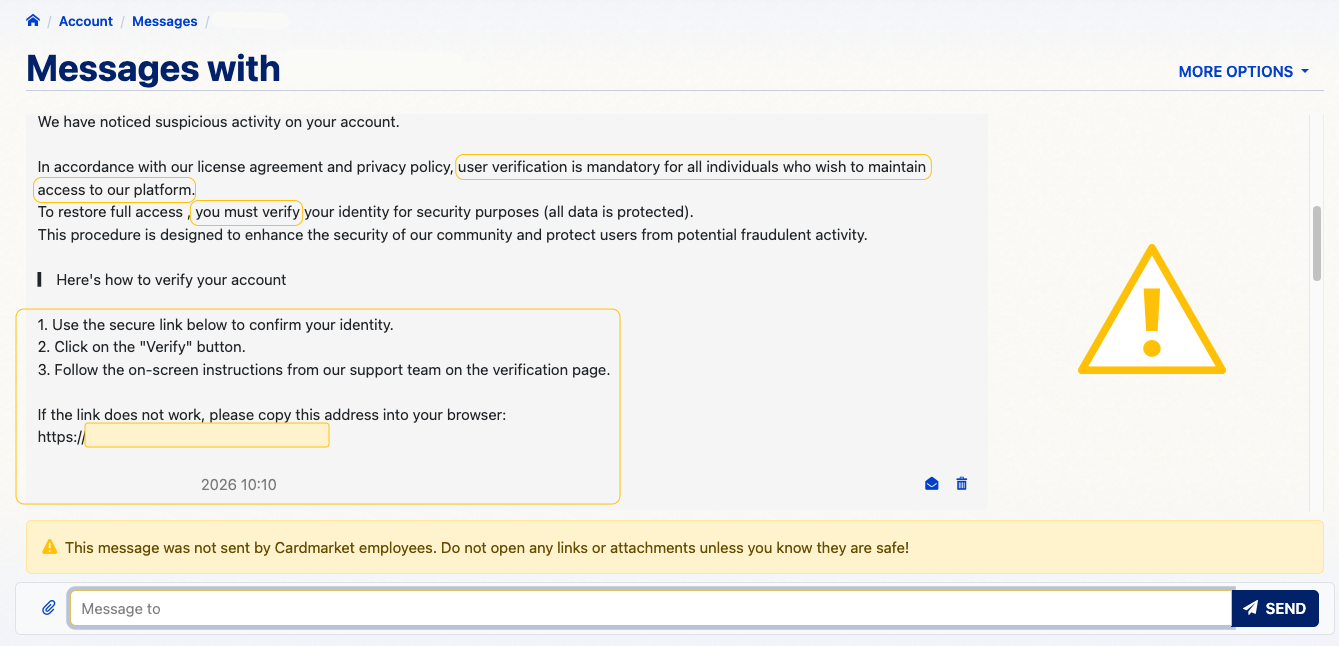
- Do not open links, QR codes, or attachments.
- Do not respond.
- Email us at [email protected] to report the suspicious message(s).
- Finally, please note that no one contacting you through private messages has the ability to block or restrict your account. They are just trying to provoke a response. Your account is safe.
Two-Factor Authentication is the BEST Way to Protect Your Account
Two-Factor Authentication is, without a doubt, the best way to secure and protect any internet account. By requiring confirmation on a device you own and have on you - your phone - no one can access your account without your knowledge, even if they have your password. It is not mandatory to enable it on Cardmarket, but we cannot recommend it highly enough. You can check out the page below for more information and can activate 2FA on this page (must be logged in).
Make Sure You Use a STRONG Password
Using a strong password (lowercase and capital letters; numbers; symbols) will make it much harder for people to brute force your account password if they get ahold of your username. You can check out the page below for some tips on creating a strong password and some general guidelines on healthy communication online!